
Microsoft Extends Windows 10 Security Updates One More Year

Good news for Windows 10 users: Microsoft has officially extended free security updates until October 12, 2027. The previous cutoff was October 2026 — only a few months away — so this extra year gives everyone more breathing room. It’s a welcome change for households, small businesses, and anyone still running older hardware that isn’t ready for Windows 11.

This extension also buys time for organizations planning their migration strategy. But it raises a familiar question: will users actually upgrade, or will they keep their Windows 10 machines as long as possible? Many PCs still run perfectly fine, and plenty of people aren’t eager to replace hardware just to meet Windows 11’s requirements. Next fall will be interesting.

Are You Still Receiving Security Updates?

Not sure if your PC is enrolled in Extended Security Updates (ESU)? It’s easy to check.

  1. Open Settings

  2. Go to Windows Update

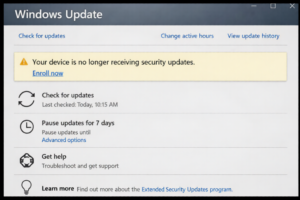
If you see a message saying your device is no longer receiving security updates along with an Enroll now link, that means your PC is not signed up for ESU. In that case, your computer is missing important monthly security patches.

Staying updated is critical — especially as Windows 10 enters its final years. If you rely on your PC daily, make sure it’s protected.

Contact me if you have questions on the Windows 10 update extension.


Always plug a surge protector into a single wall electrical outlet

For maximum safety and effectiveness, a surge protector should always be plugged directly into a properly grounded wall outlet. Never plug a surge protector into an extension cord, another surge protector, or a power strip. That setup — called daisy‑chaining — can overload the circuit, void the warranty, and most importantly, create a fire hazard.

Yesterday I was on a job where two surge protectors were plugged into each other in a loop. That’s exactly the kind of situation that can quietly damage equipment or start a fire without warning.

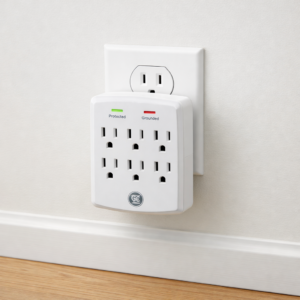
To fix the issue, I picked up a GE 6‑outlet surge protector extender tap from Office Depot/OfficeMax for $14.99. It’s compact, plugs directly into the wall, and includes a lifetime $50,000 connected‑equipment warranty, which is a nice bonus for peace of mind.

At your home or office, take a moment to check how they’re plugged in. A quick correction now can prevent a major problem later.

Mark Cavil Avatar

Mark Cavil

Owner / Technician

The owner of Computer Repairs & Solutions LLC since July 2003. I have technical and diagnostic experience in computer, laptop, game console, tablet, and phone repair.

Fact Checked & Editorial Guidelines
Reviewed by: Subject Matter Experts


Soldering Update

Soldering services will be available later in 2026. Stay tuned for practice soldering videos.

I get a lot of calls every week about broken HDMI ports on PlayStation and Xbox consoles. Fixing those usually requires soldering a new HDMI port directly onto the motherboard.

At the moment, I’m not taking on those repairs — but that will change. Later in 2026, I plan to offer full soldering services for clients.

As I build my professional soldering skills, I’ll be sharing YouTube videos and blog posts documenting the process, the tools I’m using, the skills I’m learning, and the real‑world challenges that come with this kind of work. Stay tuned!
Mark Cavil Avatar

Mark Cavil

Owner / Technician

The owner of Computer Repairs & Solutions LLC since July 2003. I have technical and diagnostic experience in computer, laptop, game console, tablet, and phone repair.

Fact Checked & Editorial Guidelines
Reviewed by: Subject Matter Experts

What Are Virtual Machines?

Want to run a Windows, Mac, or Linux operating system beta before it’s released to the public? Maybe you want to play an older game or use a program from 20 years ago that you can’t to work in Windows 11? A virtual machine makes that a reality. It can be done on your current computer. The video above explains virtual machines in more detail.


Note On Same-Day Repairs

Repair shop workbench

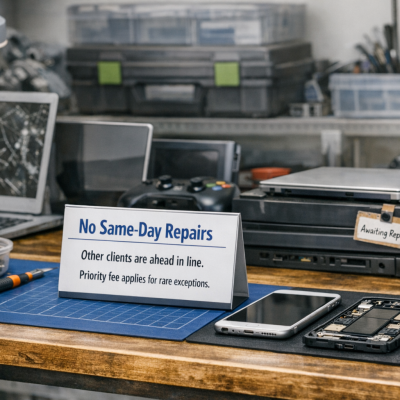
I’m not able to provide same-day emergency service for shop repairs. That’s unrealistic for me to provide a professional job. Other clients are in line waiting. Also, mistakes are made when in a rush. There are rare exceptions where I could complete the work in a couple of hours. A $50 priority fee will be added on bill if other jobs are in the shop.

Windows 11 January Update Causing Printer Problems (KB5077744)

Windows 11 printer not working after KB5077744 January Windows update

If your printer suddenly stopped working after the January Windows 11 update, you’re not alone. The monthly update KB5077744 has been causing a variety of printing issues for home users and businesses.

One of the most common problems I’ve been seeing is print jobs getting stuck in the queue — but not in the way most people expect. The print queue window may look completely empty, yet Windows is still holding onto temporary spool files behind the scenes.

What I’ve Seen in the Field

I’ve already run into this issue on two separate HP computer systems this month. In both cases:

  • The print queue showed no active jobs, but the printer wasn’t working
  • Windows was leaving behind temporary spool files that should should have been deleted after each print job

These leftover files build up inside the Windows system32\spool\printers folder.

Once those files were removed, printing worked normally again.

In a few cases, I’ve also seen actual stuck print jobs remaining in the queue, but the temporary files in the spool folder are the main cause of the problem.

Why This Happens

The January update introduced a bug in the print spooler — the Windows service that manages print jobs. When the spooler fails to delete temporary files after printing, the system gets jammed even though the queue appears empty. Nothing else can print until those files are cleared.

A Quick Fix for Most Users

To make this easier, I’ve created a small batch file that can be downloaded below:

  • Stops the print spooler                                     net stop spooler
  • Clears the leftover temporary files                 del %systemroot%\System32\spool\PRINTERS\*.* /Q
  • Restarts the print spooler                                net start spooler

This resolves the issue in most cases. 

Download

Directions: Download the batch file from link above. Right-click on the file when you want to open, and select Run as Administrator. Click Run when it asks if you want to run this software. If needed, click Run again. It won’t work if not done as Administrator.